Resumo de YouTube com IA grátis

Captura as legendas na página de um vídeo do YouTube e as envia direto para a IA que você escolher (AI Studio, Gemini, ChatGPT, Claude ou Grok) para um resumo grátis

Você precisará instalar uma extensão como Tampermonkey, Greasemonkey ou Violentmonkey para instalar este script.

You will need to install an extension such as Tampermonkey or Violentmonkey to install this script.

Você precisará instalar uma extensão como Tampermonkey ou Violentmonkey para instalar este script.

Você precisará instalar uma extensão como Tampermonkey ou Userscripts para instalar este script.

Você precisará instalar uma extensão como o Tampermonkey para instalar este script.

Você precisará instalar um gerenciador de scripts de usuário para instalar este script.

(Eu já tenho um gerenciador de scripts de usuário, me deixe instalá-lo!)

Você precisará instalar uma extensão como o Stylus para instalar este estilo.

Você precisará instalar uma extensão como o Stylus para instalar este estilo.

Você precisará instalar uma extensão como o Stylus para instalar este estilo.

Você precisará instalar um gerenciador de estilos de usuário para instalar este estilo.

Você precisará instalar um gerenciador de estilos de usuário para instalar este estilo.

Você precisará instalar um gerenciador de estilos de usuário para instalar este estilo.

(Eu já possuo um gerenciador de estilos de usuário, me deixar fazer a instalação!)

Autor
貝果
Instalações hoje
1
Total de instalações
60
Avaliações
0 0 0
Versão
0.10.0
Criado
29/07/2026
Atualizado
29/07/2026
Tamanho
168 KB
Licença
MIT
Aplicável a

YouTube Free AI Summary adds a button to YouTube that grabs the current video's subtitles and drops them straight into a freshly opened AI chat — your choice of Google AI Studio, Gemini, ChatGPT, Claude, or Grok — ready to be summarized.

It is built to solve the two problems other summary scripts run into: they can't get the subtitles of restricted videos, and long transcripts don't reach the AI in one piece, so you end up with a summary of only part of the video.
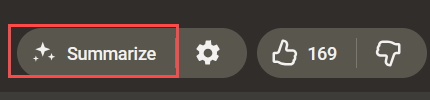
The Summarize button on a video page

Once installed, a Summarize button (outlined in red) appears next to the like / dislike buttons on the video page. One press and it starts.

Features

  • Completely free — No API key, no payment, no subscription; you only need to be logged into the AI service you picked
  • One click — Adds a button to the YouTube video page: press it and the subtitles are captured, your AI opens, and the summary starts
  • Choice of AI service — Google AI Studio, Gemini, ChatGPT, Claude, or Grok — pick your usual one in the settings
  • Works on restricted videos — Members-only, age-restricted and region-locked videos can be summarized too, as long as you can watch them yourself
  • Long videos aren't cut short — The whole transcript reaches the AI, so the summary won't stop halfway through
  • Summarize without opening the video — Hover any video thumbnail for a button that summarizes it right there
  • Custom prompt — Write your own prompt in the settings to control how the AI summarizes and what it focuses on
  • 10 interface languages — English, 繁體中文, 简体中文, 日本語, 한국어, Español, Français, Deutsch, Português (BR), Русский

How to use

  1. Install Tampermonkey, then install this script
  2. Open any YouTube video that has subtitles
  3. Click the Summarize button next to the like/dislike buttons — the subtitles are captured and your chosen AI opens with the prompt already filled in
  4. Click the gear next to it to open settings: AI service, interface language, custom prompt, timestamps, auto-submit, preferred subtitle languages

Requirements

  • Tampermonkey, or another userscript manager
  • A logged-in account on the AI service you pick — no API key, no payment, no subscription

Privacy

  • No data collection, no analytics, no server of the author's involved
  • Subtitles are read from YouTube itself (same-origin requests from the page) and handed to the AI tab you chose; nothing else leaves your browser
  • Settings are stored locally by your userscript manager

Source & support