Telegram Web Ordina per reazioni

Ti aiuta a trovare i messaggi (post) con più reazioni (mi piace) in Telegram

Dovrai installare un'estensione come Tampermonkey, Greasemonkey o Violentmonkey per installare questo script.

You will need to install an extension such as Tampermonkey or Violentmonkey to install this script.

Dovrai installare un'estensione come Tampermonkey o Violentmonkey per installare questo script.

Dovrai installare un'estensione come Tampermonkey o Userscripts per installare questo script.

Dovrai installare un'estensione come ad esempio Tampermonkey per installare questo script.

Dovrai installare un gestore di script utente per installare questo script.

(Ho già un gestore di script utente, lasciamelo installare!)

Dovrai installare un'estensione come ad esempio Stylus per installare questo stile.

Dovrai installare un'estensione come ad esempio Stylus per installare questo stile.

Dovrai installare un'estensione come ad esempio Stylus per installare questo stile.

Dovrai installare un'estensione per la gestione degli stili utente per installare questo stile.

Dovrai installare un'estensione per la gestione degli stili utente per installare questo stile.

Dovrai installare un'estensione per la gestione degli stili utente per installare questo stile.

(Ho già un gestore di stile utente, lasciamelo installare!)

Autore
sokollondon
Installazioni giornaliere
2
Installazioni totali
1.504
Valutazione
3 0 0
Versione
0.1.6
Creato il
01/12/2022
Aggiornato il
25/11/2025
Dimensione
10,1 KB
Licenza
Non disponibile
Applica a

img Language: EN, РУ

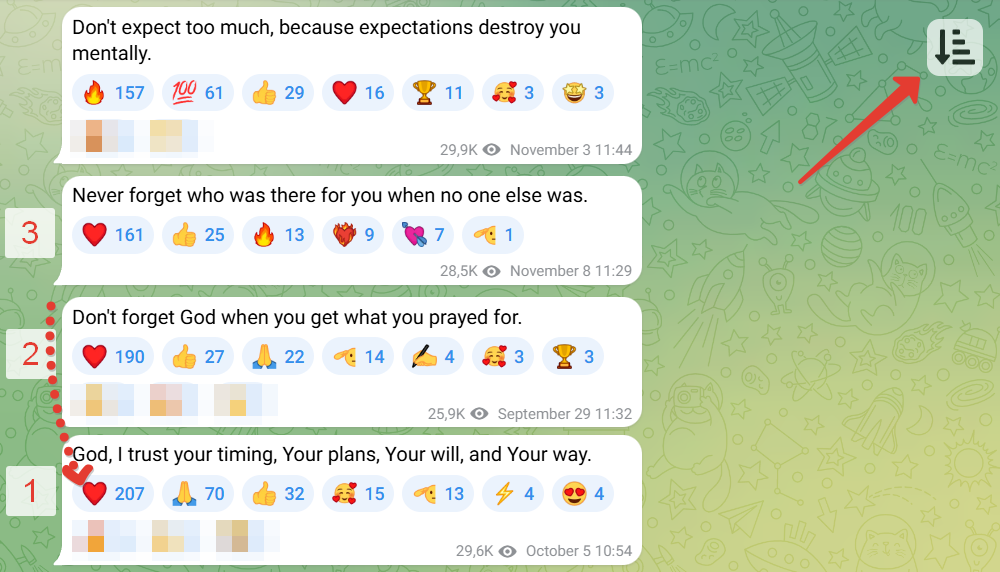
Sort by reactions. Helps you find messages (posts) with the highest number of reactions (likes) :+1:. The script adds a button to Telegram for sorting messages (up to 80 items).

Instructions

How to install and use:

On a computer (easier)

Installation

  1. Install the Tampermonkey browser extension.
  2. Then install the sorting script (green button). Or add the code manually.

Usage

  1. Open any channel or group at https://web.telegram.org/a/
  2. Press the Page Up button several times to load more messages. Or use the mouse wheel. But do not use the Home button, as not all messages will have time to load.
  3. Click the new button to sort. All messages will be sorted by the number of reactions.

If problems occur — refresh the page.


On mobile devices

Installation

  1. Install the Lemur Browser (needed because not all mobile browsers allow installing extensions)
  2. Install the Tampermonkey extension in it.
  3. Enable developer mode in the browser: open the extensions page chrome://extensions/ and activate the "Developer mode" toggle at the top.
  4. Then install the sorting script (green button)

Usage

  1. Open any channel or group at https://web.telegram.org/a/
  2. Scroll to load more messages.
  3. Click the new button to sort. All messages will be sorted by the number of reactions.

If problems occur — refresh the page.