
Welcome to Greasy Fork, a site for user scripts.
What are user scripts?
User scripts put you in control of your browsing experience. Once installed, they automatically make the sites you visit better by adding features, making them easier to use, or taking out the annoying bits. The user scripts on Greasy Fork were written by other users and posted to share with the world. They're free to install and easy to use.
Step 1: install a user script manager
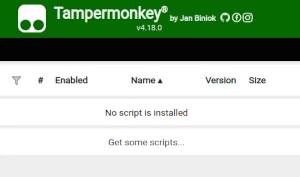
To use user scripts you need to first install a user script manager. Which user script manager you can use depends on which browser you use.
Desktop Mobile (Android) Mobile (iOS)
- Chrome: Tampermonkey or Violentmonkey
- Firefox: Greasemonkey, Tampermonkey, or Violentmonkey
- Safari: Tampermonkey or Userscripts
- Microsoft Edge: Tampermonkey or Violentmonkey
- Opera: Tampermonkey or Violentmonkey
- Maxthon: Violentmonkey
- AdGuard (no additional software required)
- Firefox: Greasemonkey, Tampermonkey, or Violentmonkey
- Microsoft Edge: Tampermonkey
- Maxthon: Violentmonkey
- Dolphin: Tampermonkey
- UC: Tampermonkey
- XBrowser (no additional software required)
- EinkBro (no additional software required)
- Safari: Tampermonkey or Userscripts
- Gear (no additional software required)
- Teak (no additional software required)
- EinkBro (no additional software required)
Step 2: install a user script
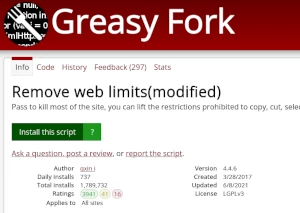
Browse this site to find a user script you want to try. Here is a sample of the most popular scripts:
- BUSTR: Busting Reminder + PDA - Helps predicts how many jail busts you can make before the penalty jails you, adds a notification to the Jail icon. Adds a per-inmate "hardness" score to the jail list with a sortable easiest-first toggle. Works on desktop, mobile, and PDA.
- Telegram Media Downloader (Improved) - Download images, GIFs, videos, and voice messages on the Telegram webapp from private channels that disable downloading and restrict saving content
- Torn War Stuff Enhanced - Show travel status and hospital time and sort by hospital time on war page.
- Nitro Type auto typer - Lets you type anything and still types correctly on Nitro Type. Extended version with extra features.
- Torn Racing Guide - In-game racing overlay detailing optimal cars, track-specific loadouts, and custom template saving. Includes dynamic upgrade highlighting.
Once you've found a user script, click the green install button on the user script's page, and your user script manager will ask you to confirm the install.
Step 3: use the user script
Go to the site the user script affects. It should automatically do its thing. After trying out the user script for a while, go back to where you installed the user script and leave some feedback for the user script's author.